

在常用的後台管理系統中,通常都會有訪問權限控制的需求,用於限制不同人員對於接口的訪問能力,如果用户不具備指定的權限,則不能訪問某些接口。
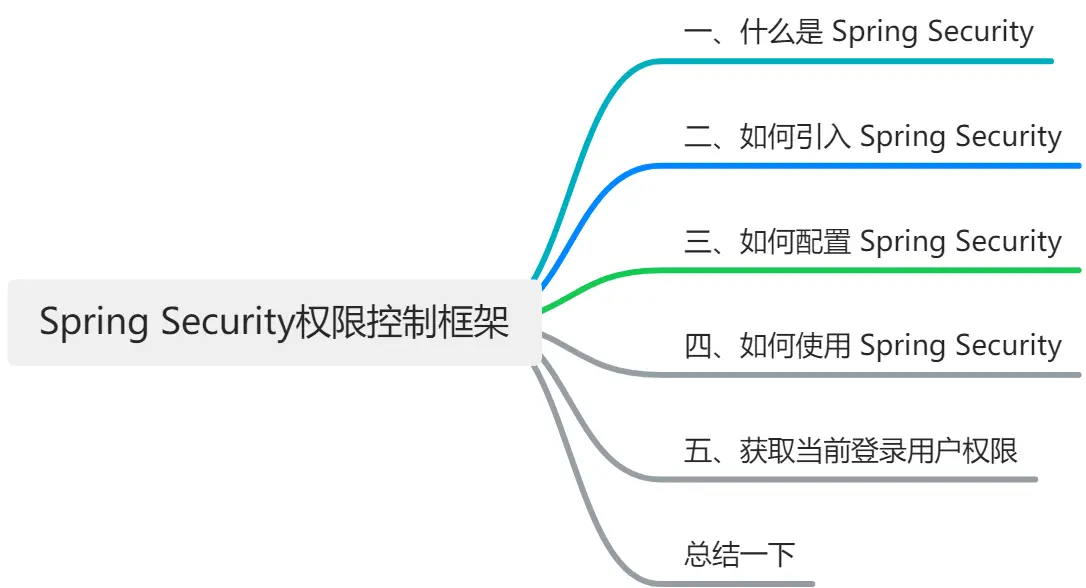
本文將用 waynboot-mall 項目舉例,給大家介紹常見後管系統如何引入權限控制框架 Spring Security。大綱如下,
一、什麼是 Spring Security
Spring Security 是一個基於 Spring 框架的開源項目,旨在為 Java 應用程序提供強大和靈活的安全性解決方案。Spring Security 提供了以下特性:
- 認證:支持多種認證機制,如表單登錄、HTTP 基本認證、OAuth2、OpenID 等。
- 授權:支持基於角色或權限的訪問控制,以及基於表達式的細粒度控制。
- 防護:提供了多種防護措施,如防止會話固定、點擊劫持、跨站請求偽造等攻擊。
- 集成:與 Spring 框架和其他第三方庫和框架進行無縫集成,如 Spring MVC、Thymeleaf、Hibernate 等。
二、如何引入 Spring Security
在 waynboot-mall 項目中直接引入 spring-boot-starter-security 依賴,
<dependencies>
    <dependency>
        <groupId>org.springframework.boot</groupId>
        <artifactId>spring-boot-starter-security</artifactId>
        <version>3.1.0</version>
    </dependency>
</dependencies>
三、如何配置 Spring Security
在 Spring Security 3.0 中要配置 Spring Security 跟以往是有些不同的,比如不在繼承 WebSecurityConfigurerAdapter。在 waynboot-mall 項目中,具體配置如下,
@Configuration
@EnableWebSecurity
@AllArgsConstructor
@EnableMethodSecurity(securedEnabled = true, jsr250Enabled = true)
public class SecurityConfig {
    private UserDetailsServiceImpl userDetailsService;
    private AuthenticationEntryPointImpl unauthorizedHandler;
    private JwtAuthenticationTokenFilter jwtAuthenticationTokenFilter;
    private LogoutSuccessHandlerImpl logoutSuccessHandler;

    @Bean
    public SecurityFilterChain filterChain(HttpSecurity httpSecurity) throws Exception {
        httpSecurity
                // cors啓用
                .cors(httpSecurityCorsConfigurer -> {})
                .csrf(AbstractHttpConfigurer::disable)
                .sessionManagement(httpSecuritySessionManagementConfigurer -> {
                    httpSecuritySessionManagementConfigurer.sessionCreationPolicy(SessionCreationPolicy.STATELESS);
                })
                .exceptionHandling(httpSecurityExceptionHandlingConfigurer -> {
                    httpSecurityExceptionHandlingConfigurer.authenticationEntryPoint(unauthorizedHandler);
                })
                // 過濾請求
                .authorizeHttpRequests(authorizationManagerRequestMatcherRegistry -> {
                    authorizationManagerRequestMatcherRegistry
                            .requestMatchers("/favicon.ico", "/login", "/favicon.ico", "/actuator/**").anonymous()
                            .requestMatchers("/slider/**").anonymous()
                            .requestMatchers("/captcha/**").anonymous()
                            .requestMatchers("/upload/**").anonymous()
                            .requestMatchers("/common/download**").anonymous()
                            .requestMatchers("/doc.html").anonymous()
                            .requestMatchers("/swagger-ui/**").anonymous()
                            .requestMatchers("/swagger-resources/**").anonymous()
                            .requestMatchers("/webjars/**").anonymous()
                            .requestMatchers("/*/api-docs").anonymous()
                            .requestMatchers("/druid/**").anonymous()
                            .requestMatchers("/elastic/**").anonymous()
                            .requestMatchers("/message/**").anonymous()
                            .requestMatchers("/ws/**").anonymous()
                            // 除上面外的所有請求全部需要鑑權認證
                            .anyRequest().authenticated();
                })
                .headers(httpSecurityHeadersConfigurer -> {
                    httpSecurityHeadersConfigurer.frameOptions(HeadersConfigurer.FrameOptionsConfig::disable);
                });
                // 處理跨域請求中的Preflight請求(cors),設置corsConfigurationSource後無需使用
                // .requestMatchers(CorsUtils::isPreFlightRequest).permitAll()
                // 對於登錄login 驗證碼captchaImage 允許匿名訪問

        httpSecurity.logout(httpSecurityLogoutConfigurer -> {
            httpSecurityLogoutConfigurer.logoutUrl("/logout");
            httpSecurityLogoutConfigurer.logoutSuccessHandler(logoutSuccessHandler);
        });
        // 添加JWT filter
        httpSecurity.addFilterBefore(jwtAuthenticationTokenFilter, UsernamePasswordAuthenticationFilter.class);
        // 認證用户時用户信息加載配置,注入springAuthUserService
        httpSecurity.userDetailsService(userDetailsService);
        return httpSecurity.build();
    }
    @Bean
    public AuthenticationManager authenticationManager(AuthenticationConfiguration authenticationConfiguration) throws Exception {
        return authenticationConfiguration.getAuthenticationManager();
    }
    /**
     * 強散列哈希加密實現
     */
    @Bean
    public BCryptPasswordEncoder bCryptPasswordEncoder() {
        return new BCryptPasswordEncoder();
    }
}
這裏詳細介紹下 SecurityConfig 配置類,
- filterChain(HttpSecurity httpSecurity) 方法是訪問控制的核心方法,這裏面可以針對 url 設置是否需要權限認證、cors 配置、csrf 配置、用户信息加載配置、jwt 過濾器攔截配置等眾多功能。
- authenticationManager(AuthenticationConfiguration authenticationConfiguration) 方法適用於啓用認證接口,需要手動聲明,否則啓動報錯。
- bCryptPasswordEncoder() 方法用户定義用户登錄時的密碼加密策略,需要手動聲明,否則啓動報錯。
四、如何使用 Spring Security
要使用 Spring Security,只需要在需要控制訪問權限的方法或類上添加相應的 @PreAuthorize 註解即可,如下,
@Slf4j
@RestController
@AllArgsConstructor
@RequestMapping("system/role")
public class RoleController extends BaseController {

    private IRoleService iRoleService;

    @PreAuthorize("@ss.hasPermi('system:role:list')")
    @GetMapping("/list")
    public R list(Role role) {
        Page<Role> page = getPage();
        return R.success().add("page", iRoleService.listPage(page, role));
    }
}
我們在 list 方法上加了 @PreAuthorize("@ss.hasPermi('system:role:list')") 註解表示當前登錄用户擁有 system:role:list 權限才能訪問 list 方法,否則返回權限錯誤。
五、獲取當前登錄用户權限
在 SecurityConfig 配置類中我們定義了 UserDetailsServiceImpl 作為我們的用户信息加載的實現類,從而通過讀取數據庫中用户的賬號、密碼與前端傳入的賬號、密碼進行比對。代碼如下,
@Slf4j
@Service
@AllArgsConstructor
public class UserDetailsServiceImpl implements UserDetailsService {

    private IUserService iUserService;

    private IDeptService iDeptService;

    private PermissionService permissionService;

    public static void main(String[] args) {
        BCryptPasswordEncoder bCryptPasswordEncoder = new BCryptPasswordEncoder();
        System.out.println(bCryptPasswordEncoder.encode("123456"));
    }

    @Override
    public UserDetails loadUserByUsername(String username) throws UsernameNotFoundException {
        // 1. 讀取數據庫中當前用户信息
        User user = iUserService.getOne(new QueryWrapper<User>().eq("user_name", username));
        // 2. 判斷該用户是否存在
        if (user == null) {
            log.info("登錄用户:{} 不存在.", username);
            throw new UsernameNotFoundException("登錄用户:" + username + " 不存在");
        }
        // 3. 判斷是否禁用
        if (Objects.equals(UserStatusEnum.DISABLE.getCode(), user.getUserStatus())) {
            log.info("登錄用户:{} 已經被停用.", username);
            throw new DisabledException("登錄用户:" + username + " 不存在");
        }
        user.setDept(iDeptService.getById(user.getDeptId()));
        // 4. 獲取當前用户的角色信息
        Set<String> rolePermission = permissionService.getRolePermission(user);
        // 5. 根據角色獲取權限信息
        Set<String> menuPermission = permissionService.getMenuPermission(rolePermission);
        return new LoginUserDetail(user, menuPermission);
    }
}
針對 UserDetailsServiceImpl 的代碼邏輯進行一個講解,大家可以配合代碼理解。
- 讀取數據庫中當前用户信息
- 判斷該用户是否存在
- 判斷是否禁用
- 獲取當前用户的角色信息
- 根據角色獲取權限信息
總結一下
本文給大家講解了後管系統如何引入權限控制框架 Spring Security 3.0 版本以及代碼實戰。相信能幫助大家對權限控制框架 Spring Security 有一個清晰的理解。後續大家可以按照本文的使用指南一步一步將 Spring Security 引入到的自己的項目中用於訪問權限控制。
想要獲取 waynboot-mall 項目源碼的同學,可以關注我公眾號【程序員wayn】,回覆 waynboot-mall 即可獲得。
如果覺得這篇文章寫的不錯的話,不妨點贊加關注,我會更新更多技術乾貨、項目教學、實戰經驗分享的文章。