
背景
近期我開發的一個C程序,在生產環境產生了coredump,但是在調試該core文件時,打出的debug信息並不全。
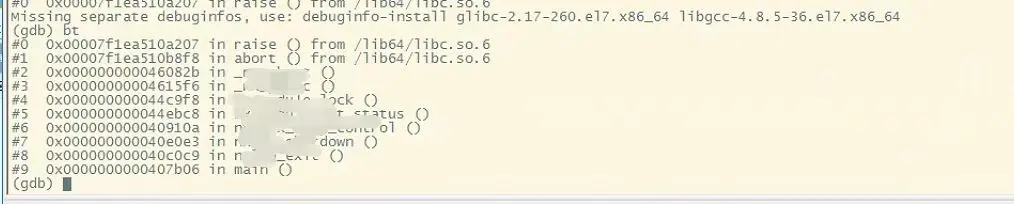
這種debug信息丟失,其實説白了,就是符號表丟失。一般由兩種情況造成,一種是編譯的時候沒有加-g參數,另一種是dwarf版本不對。
首先排除第一種可能,因為編譯腳本是我自己寫的,-g參數是有的。而唯一可能出問題的地方,就是dwarf版本不對。
而之所以出現dwarf版本不對,還是編譯環境的問題。我為了兼容編譯C++17標準的另外一個cpp項目,就對編譯環境做了容器化處理,在鏡像裏安裝了gcc11.3,而在生產環境使用的時候,gdb版本仍然是4.8.5,由於gcc版本和gdb版本不匹配,就造成了該問題的出現。
為了驗證這一點,我在物理機上重現了這種現象:
[root@ck08 ctest]# gcore `pidof flow`
Dwarf Error: wrong version in compilation unit header (is 5, should be 2, 3, or 4) [in module /root/chenyc/src/flow/flow]
[New LWP 3048]
[New LWP 3047]
[New LWP 3046]
[New LWP 3045]
[Thread debugging using libthread_db enabled]
Using host libthread_db library "/lib64/libthread_db.so.1".
0x00007f50dfd850e3 in epoll_wait () from /lib64/libc.so.6
warning: target file /proc/3044/cmdline contained unexpected null characters
Saved corefile core.3044
[Inferior 1 (process 3044) detached]我的物理機的gdb版本也是4.8.5, 我使用gcore命令生成core文件的時候,出現了下面的警告:Dwarf Error: wrong version in compilation unit header (is 5, should be 2, 3, or 4),這句話從字面意思很好理解,就是説,gdb支持的dwarf版本應該是2,3,或者4,但是當前二進制文件的dwarf版本是5,無法調試。
那麼,何為dwarf?什麼又是dwarf版本呢?
何為dwarf
所謂的dwarf,它是一種文件調試的格式。你可以將其簡單理解為調試信息的組織模式。除了dwarf之外,常見的調試格式還有stabs, COFF, pdb等。
除了pdb這種windows專用的調試格式外,絕大多數的調試格式都是支持Unix系統的。但隨着時間的推移,逐漸被dwarf一統江山,被各大主流編譯器所支持。其他的一些調試格式雖然還零星存在,但也是苟延殘喘,名存實亡。
説到dwarf自身的發展,也是經歷了好幾個階段,從1992年推出至今,已經迭代了5個版本。其中,dwarf1作為第一個版本,結構不緊湊,功能不成熟,很多編譯器都已經不支持。dwarf2是1993年PLSIG機構在初版的基礎上做了一些優化,減少了調試信息的大小,但只是有一個草案,並沒有正式發佈。
第一個正式發佈的dwarf版本是Free Standards Group於2005年發佈的dwarf3,該機構並於2010年發佈了dwarf4。目前最新的dwarf版本是2017年發佈的dwarf5。
官方説法是這樣的:
Produce debugging information in DWARF format (if that is supported). The value of version may be either 2, 3, 4 or 5; the default version for most targets is 5 (with the exception of VxWorks, TPF and Darwin/Mac OS X, which default to version 2, and AIX, which defaults to version 4).
Note that with DWARF Version 2, some ports require and always use some non-conflicting DWARF 3 extensions in the unwind tables.
Version 4 may require GDB 7.0 and
-fvar-tracking-assignmentsfor maximum benefit. Version 5 requires GDB 8.0 or higher.GCC no longer supports DWARF Version 1, which is substantially different than Version 2 and later. For historical reasons, some other DWARF-related options such as
-fno-dwarf2-cfi-asm) retain a reference to DWARF Version 2 in their names, but apply to all currently-supported versions of DWARF.
關於dwarf的調試文件格式,本文就不多做介紹了,如果展開來説,一個專題遠遠不夠。但需要明白的是,各個dwarf版本之間,數據格式也是有所區別的,這也就造成了彼此之間的不兼容,因此才會出現文章開頭出現的問題。
如何指定dwarf版本
那麼,原因定位到了,我們如何解決這個問題呢?
難不成,我需要降級gcc版本?總不能逼着客户去升級生產環境的gdb版本吧?這明顯都是不現實的。
不過好在gcc編譯器提供了指定dwarf版本的選項。我們只需要在編譯時,增加-gdwarf-version選項即可。
為了演示指定dwarf版本,我在這裏準備了一個demo。
C程序如下:
//hello.c
#include <stdio.h>

int main(void){
        char *p = "hello";
        printf("p = %s\n", p);
        p[3] = 'M';
        printf("p = %s\n", p);
        return 0;
}容器內gcc版本如下:
[root@5b2c03891f42 tmp]# gcc -v
Using built-in specs.
COLLECT_GCC=gcc
COLLECT_LTO_WRAPPER=/usr/local/libexec/gcc/x86_64-pc-linux-gnu/11.3.0/lto-wrapper
Target: x86_64-pc-linux-gnu
Configured with: ./configure --enable-languages=c,c++
Thread model: posix
Supported LTO compression algorithms: zlib
gcc version 11.3.0 (GCC)
在容器內編譯:
gcc -o hello hello.c -g該程序一定會產生core文件。我們在容器外運行,此時,這個core文件是無法調試的:
[root@ck08 ctest]# ulimit -c unlimited
[root@ck08 ctest]# ./hello
p = hello
Segmentation fault (core dumped)
[root@ck08 ctest]# gdb ./hello core.30856
GNU gdb (GDB) Red Hat Enterprise Linux 7.6.1-120.el7
Copyright (C) 2013 Free Software Foundation, Inc.
License GPLv3+: GNU GPL version 3 or later <http://gnu.org/licenses/gpl.html>
This is free software: you are free to change and redistribute it.
There is NO WARRANTY, to the extent permitted by law.  Type "show copying"
and "show warranty" for details.
This GDB was configured as "x86_64-redhat-linux-gnu".
For bug reporting instructions, please see:
<http://www.gnu.org/software/gdb/bugs/>...
Reading symbols from /root/chenyc/src/ctest/hello...Dwarf Error: wrong version in compilation unit header (is 5, should be 2, 3, or 4) [in module /root/chenyc/src/ctest/hello]
(no debugging symbols found)...done.
[New LWP 30856]
Core was generated by `./hello'.
Program terminated with signal 11, Segmentation fault.
#0  0x0000000000401164 in main ()
Missing separate debuginfos, use: debuginfo-install glibc-2.17-326.el7_9.x86_64
(gdb) bt
#0  0x0000000000401164 in main ()
(gdb)
我們嘗試指定dwarf版本編譯:
gcc -gdwarf-4 -gstrict-dwarf -fvar-tracking-assignments -o hello hello.c其中:
-gdwarf-4指定dwarf版本為4-fvar-tracking-assignments在編譯的早期對用户變量的賦值進行註釋,並嘗試在整個編譯過程中將註釋一直延續到最後,以嘗試在優化的同時改進調試信息。-gstrict-dwarf禁用更高版本的的dwarf擴展,轉而使用指定的dwarf版本的擴展
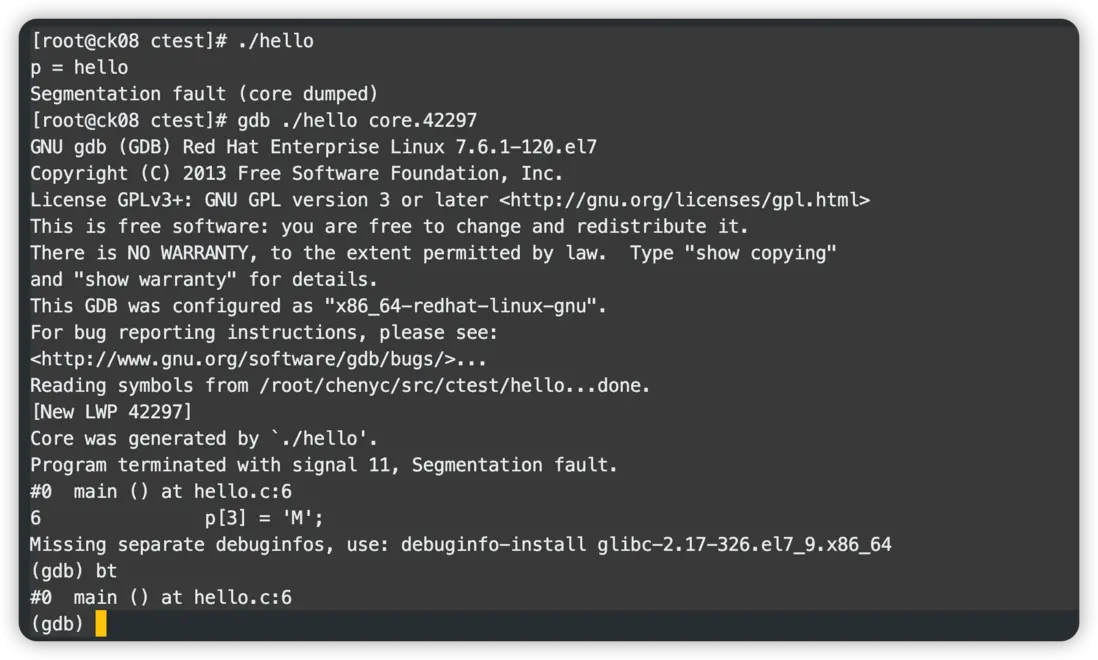
此時我們可以看到,能夠正常調試了。
通過上述的演示,理論上我們只需要在項目編譯時,指定dwarf版本,就可以正常調試了。
然而,如果問題如此簡單就能解決,那似乎沒有必要專門寫一篇文章的必要,事實上,我在使用的時候,又遇到了比較玄學的問題。
玄之又玄
截取部分編譯輸出,可以看到,我的確使用了dwarf-4版本:
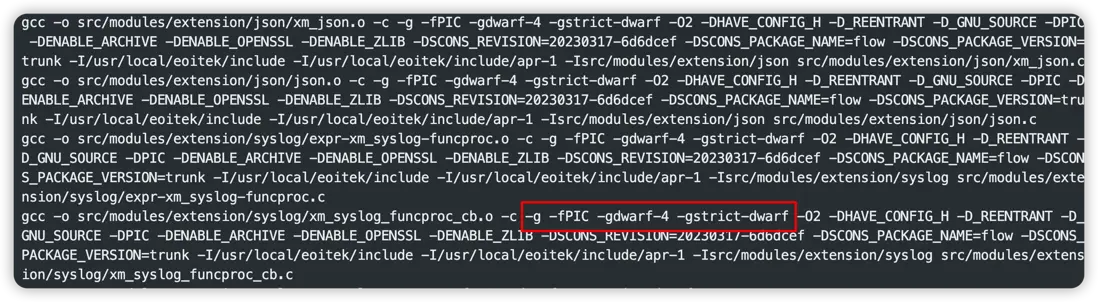
但是我們在運行時,發現仍然報Dwarf Error:
[root@ck08 flow]# gdb ./flow core.10772
GNU gdb (GDB) Red Hat Enterprise Linux 7.6.1-120.el7
Copyright (C) 2013 Free Software Foundation, Inc.
License GPLv3+: GNU GPL version 3 or later <http://gnu.org/licenses/gpl.html>
This is free software: you are free to change and redistribute it.
There is NO WARRANTY, to the extent permitted by law.  Type "show copying"
and "show warranty" for details.
This GDB was configured as "x86_64-redhat-linux-gnu".
For bug reporting instructions, please see:
<http://www.gnu.org/software/gdb/bugs/>...
Reading symbols from /root/chenyc/src/flow/flow...Dwarf Error: wrong version in compilation unit header (is 5, should be 2, 3, or 4) [in module /root/chenyc/src/flow/flow]
(no debugging symbols found)...done.
[New LWP 10773]
[New LWP 10774]
[New LWP 10775]
[New LWP 10776]
[New LWP 10772]
[Thread debugging using libthread_db enabled]
Using host libthread_db library "/lib64/libthread_db.so.1".
Core was generated by `./flow'.
#0  0x00007f13b9ae7a35 in pthread_cond_wait@@GLIBC_2.3.2 () from /lib64/libpthread.so.0
Missing separate debuginfos, use: debuginfo-install glibc-2.17-326.el7_9.x86_64
(gdb) bt
#0  0x00007f13b9ae7a35 in pthread_cond_wait@@GLIBC_2.3.2 () from /lib64/libpthread.so.0
#1  0x00000000004117d5 in nxlog_worker_thread ()
#2  0x000000000040cdd5 in _thread_helper ()
#3  0x00007f13b9ae3ea5 in start_thread () from /lib64/libpthread.so.0
#4  0x00007f13b9400b0d in clone () from /lib64/libc.so.6
(gdb) 那麼,問題出在哪呢?為什麼設置了dwarf版本,但是不生效?
為了實錘我們設置的dwarf版本確實生效了,我使用objdump命令查看了一下:
[root@ck08 flow]# objdump --dwarf=info ./flow|more

./flow:     file format elf64-x86-64

Contents of the .debug_info section:

  Compilation Unit @ offset 0x0:
   Length:        0x3e07 (32-bit)
   Version:       4
   Abbrev Offset: 0x0
   Pointer Size:  8
 <0><b>: Abbrev Number: 1 (DW_TAG_compile_unit)
    <c>   DW_AT_producer    : (indirect string, offset: 0x31f): GNU C17 11.3.0 -mtune=generic -march=x86-64 -g -gdwarf-4 -gstrict-dwa
rf -O2 -fPIC
    <10>   DW_AT_language    : 12       (ANSI C99)
    <11>   DW_AT_name        : (indirect string, offset: 0x16ac): src/core/protocol.c
    <15>   DW_AT_comp_dir    : (indirect string, offset: 0x1c15): /tmp
    <19>   DW_AT_low_pc      : 0x4090c0
    <21>   DW_AT_high_pc     : 0x127c
<29> DW_AT_stmt_list : 0x0這裏,能看到src/core/protocol.c文件編譯出來的二進制文件,dwarf版本確實是4。那麼,為什麼gdb調試仍然會報dwarf版本是5呢?
那麼,會不會是程序依賴的第三方庫使用了dwarf-5?
帶着疑問,我查看了一下所有的version:
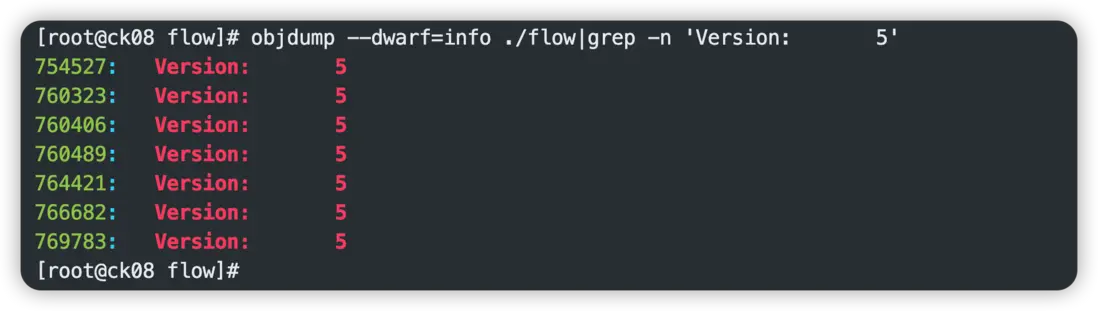
發現確實有部分二進制文件使用到了dwarf-5版本。
先把dwarf的.debug-info導出來:
objdump --dwarf=info ./flow > dwarf.info直接定位到754527行:
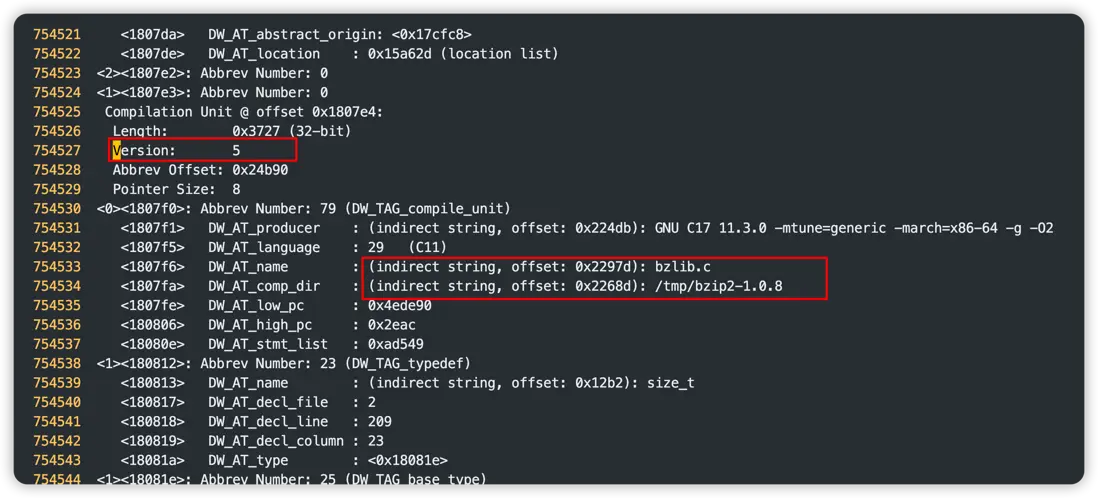
可以定位到,是在編譯bzip2庫的時候,出現了dwarf-5的版本。
為了驗證我的猜想,我直接到容器裏找到了libbz2,果然它就是罪魁禍首。
[root@5703f261ff2b lib]# objdump --dwarf=info libbz2.a|grep Version
   Version:       5
   Version:       5
   Version:       5
   Version:       5
   Version:       5
   Version:       5
   Version:       5
    <1760>   DW_AT_name        : (indirect string, offset: 0x650): BZ2_bzlibVersion
[root@5703f261ff2b lib]# 那麼問題來了,我是在容器裏編譯第三方依賴的,在編譯之前統一設置過CC環境變量:
[root@5703f261ff2b tmp]# echo $CC
gcc -gdwarf-4 -gstrict-dwarf -fvar-tracking-assignments截取部分Dockerfile內容:
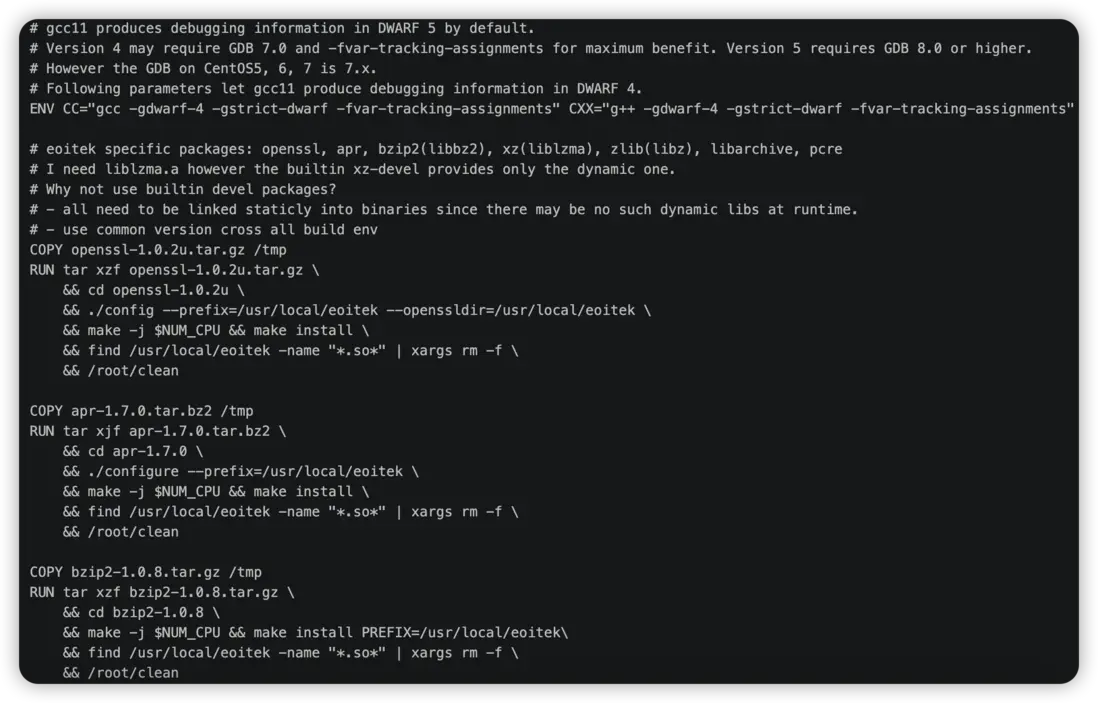
從Dockerfile可知,我們先設置了CC,然後依次編譯openssl, libapr, bzip2,那為什麼其他的依賴都沒有問題,單單bzip2沒有生效呢?
[root@5703f261ff2b lib]# objdump --dwarf=info libssl.a|grep Version
   Version:       4
   Version:       4
   Version:       4
   Version:       4
   Version:       4
   Version:       4
   Version:       4
   Version:       4
   Version:       4
Version: 4所以似乎還要到bzip2源碼本身去找原因。於是我重新解壓了bzip2的源碼包,發現它是沒有configure文件的,只有一個Makefile,打開Makefile,發現了端倪:
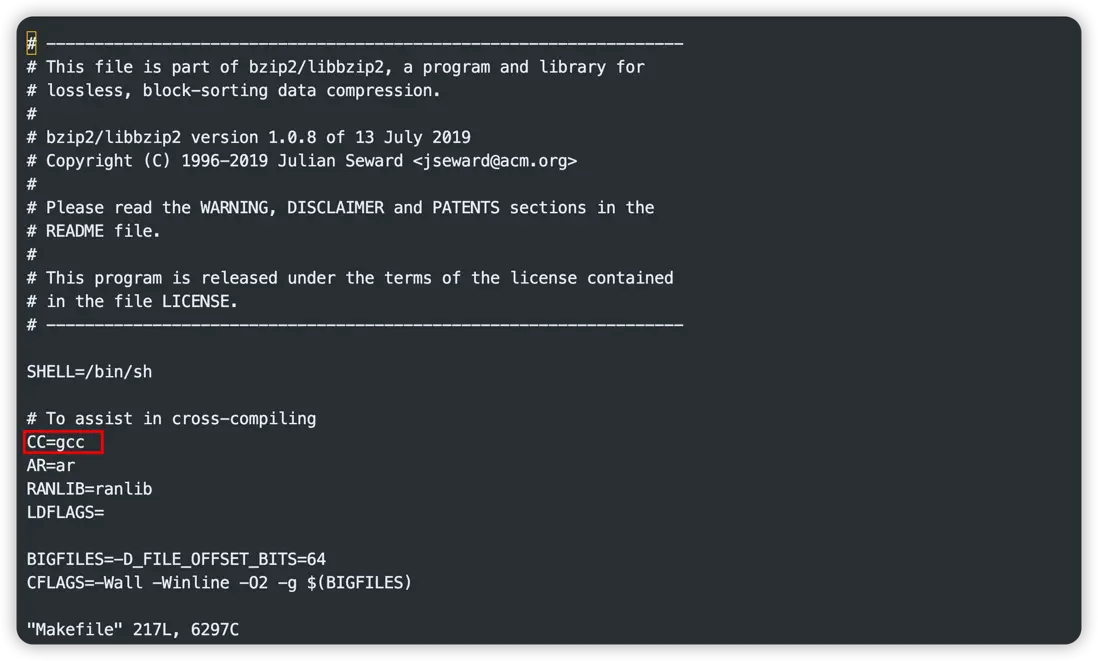
雖然我們在外面設置了CC的值,但是在Makefile裏又將其覆蓋掉了,使用的是gcc的默認dwarf版本,而我們的gcc是11.3,所以默認使用了dwarf-5版本。
這裏,明顯看到bzip2開發者省了個懶,其實比較安全一點的寫法應該是:
CC ?= gcc我們將Makefile修改一下,重新編譯,發現結果正確了:
[root@5703f261ff2b bzip2-1.0.8]# objdump --dwarf=info libbz2.a|grep Version
   Version:       4
   Version:       4
   Version:       4
   Version:       4
   Version:       4
   Version:       4
   Version:       4
<1482> DW_AT_name : (indirect string, offset: 0x60c): BZ2_bzlibVersion我使用新的bzip2庫編譯了一下程序,這時使用gcore生成core文件,已經不會報Dwarf Error了:
[root@ck08 flow]# gcore `pidof flow`
[New LWP 25963]
[New LWP 25962]
[New LWP 25961]
[New LWP 25960]
[Thread debugging using libthread_db enabled]
Using host libthread_db library "/lib64/libthread_db.so.1".
0x00007f704555fb43 in select () from /lib64/libc.so.6
warning: target file /proc/25959/cmdline contained unexpected null characters
Saved corefile core.25959
[Inferior 1 (process 25959) detached]使用gdb調試這個core文件也能拿到詳細的調試信息:
[root@ck08 flow]# gdb ./flow core.25959
GNU gdb (GDB) Red Hat Enterprise Linux 7.6.1-120.el7
Copyright (C) 2013 Free Software Foundation, Inc.
License GPLv3+: GNU GPL version 3 or later <http://gnu.org/licenses/gpl.html>
This is free software: you are free to change and redistribute it.
There is NO WARRANTY, to the extent permitted by law.  Type "show copying"
and "show warranty" for details.
This GDB was configured as "x86_64-redhat-linux-gnu".
For bug reporting instructions, please see:
<http://www.gnu.org/software/gdb/bugs/>...
Reading symbols from /root/chenyc/src/flow/flow...done.
[New LWP 25960]
[New LWP 25961]
[New LWP 25962]
[New LWP 25963]
[New LWP 25959]
[Thread debugging using libthread_db enabled]
Using host libthread_db library "/lib64/libthread_db.so.1".
Core was generated by `./flow'.
#0  0x00007f7045c52efd in open64 () from /lib64/libpthread.so.0
Missing separate debuginfos, use: debuginfo-install glibc-2.17-326.el7_9.x86_64
(gdb) bt
#0  0x00007f7045c52efd in open64 () from /lib64/libpthread.so.0
#1  0x000000000049b731 in apr_file_open (new=0x7f7034003320,
    fname=0x7f7034002ad0 "/root/chenyc/test/dc/mave/probes/itoa-flow/data/utf-8_nolb.log", flag=1, perm=<optimized out>,
    pool=0x7f7034003288) at file_io/unix/open.c:176
#2  0x000000000041c1b9 in im_file_ext_input_open (module=0x2313a00, file=0x7f7045253fd8, finfo=0x7f704524eaa0, readfromlast=false,
    existed=true) at src/modules/input/fileExt/im_fileExt.c:976
#3  0x000000000041f51f in im_file_ext_check_file (module=<optimized out>, file=<optimized out>, fname=<optimized out>,
    pool=<optimized out>) at src/modules/input/fileExt/im_fileExt.c:1315
#4  0x0000000000420294 in im_file_ext_check_files (module=0x2313a00, active_only=<optimized out>)
    at src/modules/input/fileExt/im_fileExt.c:1475
#5  0x000000000042076b in im_file_ext_read (module=0x2313a00) at src/modules/input/fileExt/im_fileExt.c:2981
#6  0x00000000004208f8 in im_file_ext_event (module=0x2313a00, event=0x7f702c0008c0) at src/modules/input/fileExt/im_fileExt.c:3583
#7  0x00000000004118da in nxlog_worker_thread (thd=0x22f1c08, data=<optimized out>) at src/core/nxlog.c:552
#8  0x000000000040cdd5 in _thread_helper (thd=0x22f1c08, d=0x7ffc646c4050) at src/core/core.c:85
#9  0x00007f7045c4bea5 in start_thread () from /lib64/libpthread.so.0
#10 0x00007f7045568b0d in clone () from /lib64/libc.so.6
(gdb)
總結
dwarf error的問題,網上很多資料説得很含糊,大多也都一知半解,真要深入研究,還是有很多坑的。反正總之從以下幾個思路進行切入,基本都能找到解決方向:
dwarf error一般出現在gcc編譯環境版本與gdb調試環境版本不匹配導致,一般可以通過編譯時指定dwarf版本解決- 除了我們自身的源碼需要指定
dwarf版本,程序所依賴的第三方庫也需要使用指定的dwarf版本進行編譯
參考資料
- https://gcc.gnu.org/onlinedocs/gcc/Debugging-Options.html
- https://zhuanlan.zhihu.com/p/419908664