
Vue作為最近最炙手可熱的前端框架,其簡單的入門方式和功能強大的API是其優點。而同時因為其API的多樣性和豐富性,所以他的很多開發方式就和一切基於組件的React不同,如果沒有對Vue的API(有一些甚至文檔都沒提到)有一個全面的瞭解,那麼在開發和設計一個組件的時候有可能就會繞一個大圈子,所以我非常推薦各位在學習Vue的時候先要對Vue核心的所有API都有一個瞭解。這篇文章我會從實踐出發,遇到一些知識點會順帶總結一下。文章很長,一次看不完可以先收藏,如果你剛入門vue,那麼相信這篇文章對你以後的提升絕對有幫助
進入正題,我相信不論什麼項目幾乎都會有一個必不可少的功能,就是用户操作反饋、或者提醒.像這樣(簡單的一個demo)

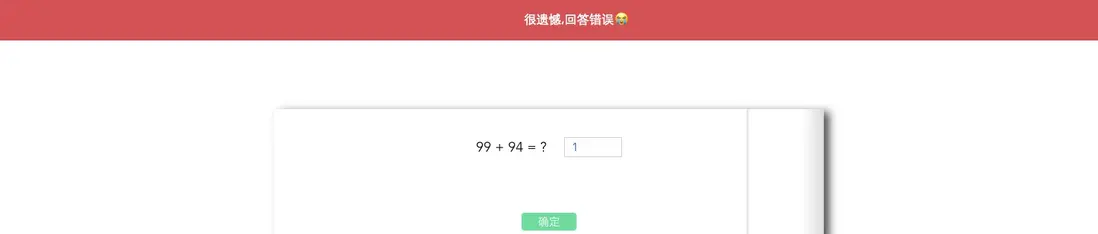
其實在vue的中大型項目中,這些類似的小功能會更加豐富以及嚴謹,而在以Vue作為核心框架的前端項目中,因為Vue本身是一個組件化和虛擬Dom的框架,要實現一個通知組件的展示當然是非常簡單的。但因為通知組件的使用特性,直接在模板當中書寫組件並通過v-show或者props控制通知組件的顯示顯然是非常不方便的並且這樣意味着你的代碼結構要變,當各種各樣的彈層變多的時候,我們都將其掛載到APP或者一個組件下顯然不太合理,而且如果要在action或者其他非組件場景中要用到通知,那麼純組件模式的用法也無法實現。那麼有沒有辦法即用到Vue組件化特性方便得實現一個通知組件的展現,那麼我們可否用一個方法來控制彈層組件的顯示和隱藏呢?
目標一
實現一個簡單的反饋通知,可以通過方法在組件內直接調用。比如Vue.$confirm({...obj})
首先,我們來實現通知組件,相信這個大部分人都能寫出來一個像模像樣的組件,不囉嗦,直接上代碼
<template>
    <div
        :class="type"
        class="eqc-notifier">
        <i
            :class="iconClass"
            class="icon fl"/>
        <span>{{ msg }}</span>
    <!-- <span class="close fr eqf-no" @click="close"></span> -->
    </div>
</template>

<script>
export default {
    name: 'Notification',
    props: {
        type: {
            type: String,
            default: ''
        },
        msg: {
            type: String,
            default: ''
        }
    },
    computed: {
        iconClass() {
            switch (this.type) {
                case 'success':
                    return 'eqf-info-f'
                case 'fail':
                    return 'eqf-no-f'
                case 'info':
                    return 'eqf-info-f'
                case 'warn':
                    return 'eqf-alert-f'
            }
        }
    },
    mounted() {
        setTimeout(() => this.close(), 4000)
    },
    methods: {
        close() {
        }
    }
}
</script>

<style lang="scss">
    .eqc-notifier {
        position: fixed;
        top: 68px;
        left: 50%;
        height: 36px;
        padding-right: 10px;
        line-height: 36px;
        box-shadow: 0 0 16px 0 rgba(0, 0, 0, 0.16);
        border-radius: 3px;
        background: #fff;
        z-index: 100; // 層級最高
        transform: translateX(-50%);
        animation: fade-in 0.3s;
    .icon {
        margin: 10px;
        font-size: 16px;
    }
    .close {
        margin: 8px;
        font-size: 20px;
        color: #666;
        transition: all 0.3s;
        cursor: pointer;
        &:hover {
            color: #ff296a;
        }
    }
    &.success {
        color: #1bc7b1;
    }
    &.fail {
        color: #ff296a;
    }
    &.info {
        color: #1593ff;
    }
    &.warn {
        color: #f89300;
    }
    &.close {
        animation: fade-out 0.3s;
    }
    }
</style>
在這裏需要注意,我們定義了一個close方法,但內容是空的,雖然在模板上有用到,但是似乎沒什麼意義,在後面我們要擴展組件的時候我會講到為什麼要這麼做。
創建完這個組件之後,我們就可以在模板中使用了<notification type="xxx" msg="xxx" />
實現通過方法調用該通知組件
其實在實現通過方法調用之前,我們需要擴展一下這個組件,因為僅僅這些屬性,並不夠我們使用。在使用方法調用的時候,我們需要考慮一下幾個問題:
- 顯示反饋的定位
- 組件的出現和自動消失控制
- 連續多次調用通知方法,如何排版多個通知
在這個前提下,我們需要擴展該組件,但是擴展的這些屬性不能直接放在原組件內,因為這些可能會影響組件在模板內的使用,那怎麼辦呢?這時候我們就要用到Vue裏面非常好用的一個API,extend,通過他去繼承原組件的屬性並擴展他。
來看代碼
import Notifier from './Notifier.vue'

function install(Vue) {
    Vue.notifier = Vue.prototype.notifier = {
        success,
        fail,
        info,
        warn
    }
}

function open(type, msg) {
    let UiNotifier = Vue.extend(Notifier)
    let vm = new UiNotifier({
        propsData: { type, msg },
        methods: {
            close: function () {
                let dialog = this.$el
                dialog.addEventListener('animationend', () => {
                    document.body.removeChild(dialog)
                    this.$destroy()
                })
                dialog.className = `${this.type} eqc-notifier close`
                dialog = null
            }
        }
    }).$mount()
    document.body.appendChild(vm.$el)
}

function success(msg) {
    open('success', msg)
}

function fail(msg) {
    open('fail', msg)
}

function info(msg) {
    open('info', msg)
}

function warn(msg) {
    open('warn', msg)
}

Vue.use(install)

export default install
可以看到close方法在這裏被實現了,那麼為什麼要在原組件上面加上那些方法的定義呢?因為需要在模板上綁定,而模板是無法extend的,只能覆蓋,如果要覆蓋重新實現,那擴展的意義就不是很大了。其實這裏只是一個消息彈窗組件,是可以在模板中就被實現,還有插件怎麼注入,大家都可以自己抉擇。
同時在使用extend的時候要注意:
-
方法和屬性的定義是直接覆蓋的
- 生命週期方法類似餘mixin,會合並,也就是原組件和繼承之後的組件都會被調用,原組件先調用
首先通過 let UiNotifier = Vue.extend(Notifier),我們得到了一個類似於Vue的子類,接着就可以通過new UiNotifier({...options})的方式去創建Vue的實例了,同時通過該方式創建的實例,會有組件定義裏面的所有屬性。
在創建實例之後,vm.$mount()手動將組件掛載到DOM上面,這樣我們可以不依賴Vue組件樹來輸出DOM片段,達到自由顯示通知的效果。
擴展:
(
説一下$mount,我們也許很多項目的主文件是這樣的
new Vue({
    router,
    store,
    el: '#app',
    render: h => h(App)
})
其實el與$mount在使用效果上沒有任何區別,都是為了將實例化後的vue掛載到指定的dom元素中。如果在實例化vue的時候指定el,則該vue將會渲染在此el對應的dom中,反之,若沒有指定el,則vue實例會處於一種“未掛載”的狀態,此時可以通過$mount來手動執行掛載。值得注意的是如果$mount沒有提供參數,模板將被渲染為文檔之外的的元素,並且你必須使用原生DOM API把它插入文檔中,所以我上面寫的你應該明白了吧!
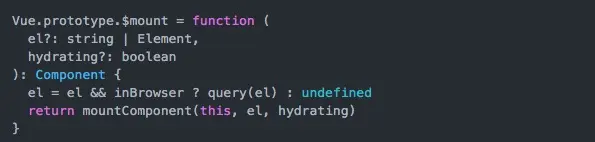
這是$mount的一個源碼片段,其實$mount的方法支持傳入2個參數的,第一個是 el,它表示掛載的元素,可以是字符串,也可以是 DOM 對象,如果是字符串在瀏覽器環境下會調用 query 方法轉換成 DOM 對象的。第二個參數是和服務端渲染相關,在瀏覽器環境下不需要傳第二個參數。)
好了,我們現在其實就可以在組件中:
this.notifier[state](msg)來調用了,是不是很方便?
進階
我們剛才實現了在Vue中通過方法來進行用户反饋的提醒,再增加一個難度:我們vue項目中應該也遇到過這種情況,彈出一個對話框或是選擇框?不但要求用方法彈出,並且能接收到對話框交互所返回的結果。
這裏就不詳細的分析了直接上代碼説(之前的代碼,用render來寫的組件,懶得改了,直接拿來用...),先創建一個對話框組件---Confirm.vue
<script>
    let __this = null
    export default {
        name: 'Confirm',
        data() {
            return {
                config: {
                    msg: '',
                    ifBtn: '',
                    top: null
                }
            }
        },
        created() {
            __this = this
        },
        methods: {
            createBox(h) {
                let config = {}
                config.attrs = {
                    id: '__confirm'
                }
                let children = []
                children.push(this.createContainer(h))
                children.push(this.createBg(h))
                return h('div', config, children)
            },
            createBg(h) {
                return h('div', {
                    class: 'bg',
                    on: {
                        click: __this.$cancel
                    }
                })
            },
            createContainer(h) {
                let config = {}
                config.class = {
                    'box-container': true
                }
                if (__this.config.top) {
                    config.style = {
                        'top': __this.config.top + 'px',
                        'transform': 'translate(-50%, 0)'
                    }
                }
                let children = []
                children.push(this.createContentBox(h))
                children.push(this.createClose(h))
                if (__this.config.ifBtn) {
                    children.push(__this.createBtnBox(h))
                }
                return h('div', config, children)
            },
            createContentBox(h) {
                let config = {}
                config.class = {
                    'content-box': true
                }
                return h('div', config, [__this.createContent(h)])
            },
            createContent(h) {
                let config = {}
                config.domProps = {
                    innerHTML: __this.config.msg
                }
                return h('p', config)
            },
            createClose(h) {
                return h('i', {
                    class: 'eqf-no pointer close-btn',
                    on: {
                        click: __this.$cancel
                    }
                })
            },
            createBtnBox(h) {
                return h(
                    'div', {
                        class: {
                            'btn-box': true
                        }
                    }, [
                        __this.createBtn(h, 'btn-cancel middle mr10', '取消', __this.$cancel),
                        __this.createBtn(h, 'btn-primary middle mr10', '確定', __this.$confirm)
                    ])
            },
            createBtn(h, styles, content, callBack) {
                return h('button', {
                    class: styles,
                    on: {
                        click: callBack
                    }
                }, content)
            }
        },
        render(h) {
            return this.createBox(h)
        }
    }
    </script>

    <style scoped>
    #__confirm {
        position: fixed;
        top: 0;
        left: 0;
        z-index: 10;
        width: 100%;
        height: 100%;
    }
    #__confirm .bg {
        position: fixed;
        top: 0;
        left: 0;
        z-index: 0;
        width: 100%;
        height: 100%;
    }
    #__confirm .box-container {
        position: absolute;
        width: 500px;
        padding: 20px;
        padding-top: 30px;
        border-radius: 3px;
        background: #fff;
        z-index: 1;
        box-shadow: 2px 2px 10px rgba(0,0,0,0.4);
        top: 50%;
        left: 50%;
        transform: translate(-50%, -50%);
    }
    #__confirm .content-box {
        font-size: 14px;
        line-height: 20px;
        margin-bottom: 10px;
    }
    #__confirm .btn-box {
        margin-top: 20px;
        text-align: right;
    }
    #__confirm .close-btn {
        position: absolute;
        top: 15px;
        right: 20px;
        font-size: 16px;
        color: #666666;
    }
    #__confirm .close-btn:hover {
        color: #1593FF;
    }
        #__confirm .bg {
            position: fixed;
        }
    </style>
然後創建confirm.js
'use strict'
import Confirm from './Confirm.vue'
const confirmConstructor = Vue.extend(Confirm)

const ConfirmViewStyle = config => {
    const confirmInstance = new confirmConstructor({
        data() {
            return {
                config
            }
        }
    })
    confirmInstance.vm = confirmInstance.$mount()
    confirmInstance.dom = confirmInstance.vm.$el
    document.body.appendChild(confirmInstance.dom)
}

const close = () => {
    let dom = document.querySelector('body .modelServe-container')
    dom && dom.remove()
    Vue.prototype.$receive = null
}

const closeConfirm = () => {
    let dom = document.getElementById('__confirm')
    dom && dom.remove()
    Vue.prototype.$confirm = null
}

function install(Vue) {
    Vue.prototype.modelServe = {
        confirm: (obj) => {
            return new Promise(resolve => {
                Vue.prototype.$confirm = (data) => {
                    resolve(data)
                    closeConfirm()
                }
                ConfirmViewStyle(obj)
            })
        }
    }
    Vue.prototype.$dismiss = close
    Vue.prototype.$cancel = closeConfirm
}
Vue.use(install)
export default install
思路很簡單,在我們創建的時候同時返回一個promise,同時將resolve通行證暴露給vue的一個全局方法也就是將控制權暴露給外部,這樣我們就可以向這樣,我上面的confiram.vue是直接把取消綁定成了$cancel,把確定綁定成了$confirm,所以點擊確定會進入full,也就是.then中,當然你也可以傳參數
this.modelServe.confirm({
    msg: '返回後數據不會被保存,確認?',
    ifBtn: true
}).then(_ => {
    this.goBack()
}).catch()
寫的有點多,其實還可以擴展出好多技巧,比如模態框中傳一個完整的組件,並展示出來,簡單地寫一下,其實只需改動一點
import Model from './Model.vue'
const modelConstructor = Vue.extend(Model)
const modelViewStyle = (obj) => {
let component = obj.component
const modelViewInstance = new modelConstructor({
    data() {
        return {
            disabledClick: obj.stopClick // 是否禁止點擊遮罩層關閉
        }
    }
})
let app = document.getElementById('container')
modelViewInstance.vm = modelViewInstance.$mount()
modelViewInstance.dom = modelViewInstance.vm.$el
app.appendChild(modelViewInstance.dom)
new Vue({
    el: '#__model__',
    mixins: [component],
    data() {
        return {
            serveObj: obj.obj
        }
    }
})
}

...

Vue.prototype.modelServe = {
    open: (obj) => {
        return new Promise(resolve => {
            modelViewStyle(obj, resolve)
            Vue.prototype.$receive = (data) => {
                resolve(data)
                close()
            }
        })
    }
}
調用:
sendCallBack() {
    this.modelServe.open({
        component: AddCallback,
        stopClick: true
    }).then(data =>
        if (data === 1) {
            this.addInit()
        } else {
            this.goBack()
        }
    })
},
這裏我們用了mixins,最後最後再簡單地介紹一下mixins,extend,extends的區別
**- Vue.extend使用基礎 Vue 構造器,創建一個“子類”。參數是一個包含組件選項的對象。
- mixins 選項接受一個混入對象的數組。這些混入實例對象可以像正常的實例對象一樣包含選項,他們將在 Vue.extend() 裏最終選擇使用相同的選項合併邏輯合併。舉例:如果你的混入包含一個鈎子而創建組件本身也有一個,兩個函數將被調用。Mixin 鈎子按照傳入順序依次調用,並在調用組件自身的鈎子之前被調用。
注意(data混入組件數據優先鈎子函數將混合為一個數組,混入對象的鈎子將在組件自身鈎子之前調用,值為對象的選項,例如 methods, components 和 directives,將被混合為同一個對象。兩個對象鍵名衝突時,取組件對象的鍵值對。) - extends 允許聲明擴展另一個組件(可以是一個簡單的選項對象或構造函數),而無需使用 Vue.extend。這主要是為了便於擴展單文件組件。這和 mixins 類似。**
概括
extend用於創建vue實例
mixins可以混入多個mixin,extends只能繼承一個
mixins類似於面向切面的編程(AOP),extends類似於面向對象的編程
優先級Vue.extend>extends>mixins
總結
到這裏,關於如何實現通過方法調用一個Vue組件內容以及用到的一些API以及原理就差不多了,代碼如有不懂得地方可以隨時提問,歡迎交流。
