

apply和call還有bind都是函數的方法, 三個方法都能改變函數裏面 this 的指向,改變後的函數 this 指向方法內的第一個參數。 apply和call 的主要區別在於,apply 後面向函數傳遞參數是借用的數組的形式,而 call 則使用逗號將參數分隔開即可。而 bind 的作用和傳參方式都和call是一樣的,但是bind不會主動調用函數,而是返回一個函數,所以多了個接收->調用的步驟,詳情請看下方示例。
call: 可以直接調用函數:
function fun(){
    console.log('hello world!')
}
fun.call() //會直接輸出 hello world!
然後一個關於改變 this 指向的直觀例子:
function say(){
    console.log(this.name)    //可以看到這裏並沒有name
}
//定義一個對象
const cat = { name: '小花' }
say.call(cat)        //這裏會直接輸出 小花
示例:
<!DOCTYPE html>
<html lang="en">
<head>
  <meta charset="UTF-8">
  <meta http-equiv="X-UA-Compatible" content="IE=edge">
  <meta name="viewport" content="width=device-width, initial-scale=1.0">
  <title>Document</title>
</head>
<body>
  <script>
    //call 的方法會把函數的 this指向 指向函數的第一個參數,call傳參的方式是逗號分隔開
    const sm = {
      name: '蜘蛛俠',
      age: 25,
      dreams(truthName ,truthAge){
        this.name = truthName
        this.age = truthAge
      }
    }
    sm.dreams('託比', 23)
    console.log(`sm的`,sm);

    const em = {
      name: '鋼鐵俠',
      age: 25
    }
    sm.dreams.call(em , '小羅伯特唐尼' , 88)
    console.log(`em的`,em);


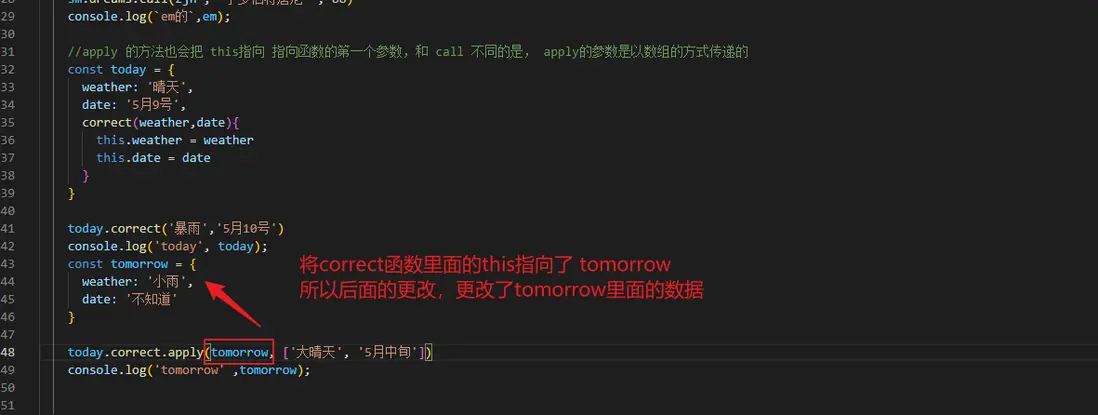
    //apply 的方法也會把 this指向 指向函數的第一個參數,和 call 不同的是, apply的參數是以數組的方式傳遞的
    const today = {
      weather: '晴天',
      date: '5月9號',
      correct(weather,date){
        this.weather = weather
        this.date = date
      }
    }

    today.correct('暴雨','5月10號')
    console.log('today', today);
    const tomorrow = {
      weather: '小雨',
      date: '不知道'
    }
    today.correct.apply(tomorrow, ['大晴天', '5月中旬'])
    console.log('tomorrow' ,tomorrow);

    //bind 和上面的兩個方法的效果差不多, 但是 bind 不會調用函數進行操作, 而是返回一個函數,所以需要使用一個變量去接收
    const cat = {
      name: '小花',
      like(food1, food2){
        console.log(`我是${this.name},我喜歡吃${food1}和${food2}`)
      }
    }
    cat.like('🐟','貓糧')

    const dog = {
      name: '旺財'
    }
    //因為 bind 不會直接調用函數而是返回一個函數,所以需要接收一下 ,其實和call差不多,只是多了接收和調用
    let bindFun = cat.like.bind(dog, '🥩','骨頭')
    bindFun()   //調用輸出


  </script>
</body>
</html>
圖示:
歡迎指錯!
