

推送監聽接口 (addPushReceiver)
描述:添加推送監聽,可監聽接收到的自定義消息(透傳消息)、通知消息、通知欄點擊事件、別名和標籤變更操作。
/**
 * com.mob.pushsdk.MobPush.class
 * MobPush推送監聽接口
 * @param receiver 監聽
 */
public static void addPushReceiver(MobPushReceiver receiver)
示例代碼
MobPushReceiver mobPushReceiver = new MobPushReceiver() {

        @Override
        public void onCustomMessageReceive(Context context, MobPushCustomMessage message) {
            //接收到自定義消息(透傳消息)
            message.getMessageId();//獲取任務ID
            message.getContent();//獲取推送內容
        }

        @Override
        public void onNotifyMessageReceive(Context context, MobPushNotifyMessage message) {
            //接收到通知消息
            message.getMobNotifyId();//獲取消息ID
            message.getMessageId();//獲取任務ID
            message.getTitle();//獲取推送標題
            message.getContent();//獲取推送內容
        }

        @Override
        public void onNotifyMessageOpenedReceive(Context context, MobPushNotifyMessage message) {
            //通知被點擊事件
            message.getMobNotifyId();//獲取消息ID
            message.getMessageId();//獲取任務ID
            message.getTitle();//獲取推送標題
            message.getContent();//獲取推送內容
        }

        @Override
        public void onTagsCallback(Context context, String[] tags, int operation, int errorCode) {
            //標籤操作回調
            //tags: RegistrationId已添加的標籤
            //operation: 0獲取標籤 1設置標籤 2刪除標籤
            //errorCode: 0操作成功 非0操作失敗
        }

        @Override
        public void onAliasCallback(Context context, String alias, int operation, int errorCode) {
            //別名操作回調
            //alias: RegistrationId對應的別名
            //operation: 0獲取別名 1設置別名 2刪除別名
            //errorCode: 0操作成功 非0操作失敗
        }

    };
移除推送監聽接口 (removePushReceiver)
描述:移除通知監聽,與addPushReceiver()對應,添加推送監聽後,在關閉界面時調用進行移除,移除之前添加過的推送監聽。
/**
 * com.mob.pushsdk.MobPush.class
 * 移除Push監聽接口
 * @param receiver 監聽
 */
 public static void removePushReceiver(MobPushReceiver receiver)
示例代碼
MobPush.removePushReceiver(receiver);獲取註冊Id (getRegistrationId)
描述:獲取註冊id。RegistrationId是MobPush針對不同用户生成的唯一標識符,可通過RegistrationId向用户推送消息。
/**
 * com.mob.pushsdk.MobPush.class
 * 獲取註冊id
 * @param callback 回調
 */
 public static void getRegistrationId(MobPushCallback<String>  callback)
示例代碼
MobPush.getRegistrationId(new MobPushCallback<String>() {
            @Override
            public void onCallback(String s) {
                Log.i(TAG, "RegistrationId: "+s);
            }
 });
設置別名 (setAlias)
描述:設置別名。別名是唯一的,與RegistrationId為一對一關係。如多次調用,會以最後一次設置為準,進行覆蓋;
是否設置成功,會在addPushReceiver()->MobPushReceiver-> onAliasCallback(Context context, String alias, int operation, int errorCode)中進行回調返回。當operation為0時,表示獲取別名操作;當operation為1時,表示設置別名操作;當operation為2時,表示刪除別名操作。當errorCode為0時,表示操作成功;當errorCode非0時,表示操作失敗。別名支持:字母(區分大小寫)、數字、下劃線、漢字、特殊字符@!#$&*+=.|。
/**
 * com.mob.pushsdk.MobPush.class
 * 設置別名
 * @param alias 想要設置的別名
 */
 public static void setAlias(String alias)
示例代碼
MobPush.setAlias("想要設置的別名");刪除別名 (deleteAlias)
描述:刪除別名。是否刪除成功,會在addPushReceiver()->MobPushReceiver-> onAliasCallback(Context context, String alias, int operation, int errorCode)中進行回調返回。當operation為0時,表示獲取別名操作;當operation為1時,表示設置別名操作;當operation為2時,表示刪除別名操作。當errorCode為0時,表示操作成功;當errorCode非0時,表示操作失敗。
/**
 * com.mob.pushsdk.MobPush.class
 * 刪除別名
 */
 public static void deleteAlias()
示例代碼
MobPush.deleteAlias();獲取別名 (getAlias)
描述:獲取別名。是否獲取成功,會在addPushReceiver()->MobPushReceiver-> onAliasCallback(Context context, String alias, int operation, int errorCode)中進行回調返回。當operation為0時,表示獲取別名操作;當operation為1時,表示設置別名操作;當operation為2時,表示刪除別名操作。當errorCode為0時,表示操作成功;當errorCode非0時,表示操作失敗。
/**
 * com.mob.pushsdk.MobPush.class
 * 獲取別名
 */
 public static void getAlias()
示例代碼
MobPush.getAlias();添加標籤 (addTags)
描述:添加標籤。標籤可以添加多個,每次調用都會在原來的基礎上進行追加。是否獲取成功,會在addPushReceiver()->MobPushReceiver-> onTagsCallback(Context context, String[] tags, int operation, int errorCode)中進行回調返回。當operation為0時,表示獲取標籤操作;當operation為1時,表示設置標籤操作;當operation為2時,表示刪除標籤操作。當errorCode為0時,表示操作成功;當errorCode非0時,表示操作失敗。標籤支持:字母(區分大小寫)、數字、下劃線、漢字、特殊字符@!#$&*+=.|。
/**
 * com.mob.pushsdk.MobPush.class
 * 添加標籤
 * @param tags  想要添加的標籤
 */
 public static void addTags(String[] tags)
示例代碼
MobPush.addTags(new String[]{"想要添加的標籤1", "想要添加的標籤2"});刪除標籤 (deleteTags)
描述:刪除標籤。是否獲取成功,會在addPushReceiver()->MobPushReceiver-> onTagsCallback(Context context, String[] tags, int operation, int errorCode)中進行回調返回。當operation為0時,表示獲取標籤操作;當operation為1時,表示設置標籤操作;當operation為2時,表示刪除標籤操作。當errorCode為0時,表示操作成功;當errorCode非0時,表示操作失敗。
/**
 * com.mob.pushsdk.MobPush.class
 * 添加標籤
 * @param tags  想要刪除的標籤
 */
 public static void deleteTags(String[] tags)
示例代碼
MobPush.deleteTags(new String[]{"想要刪除的標籤1", "想要刪除的標籤2"});獲取標籤 (getTags)
描述:獲取標籤。是否獲取成功,會在addPushReceiver()->MobPushReceiver-> onTagsCallback(Context context, String[] tags, int operation, int errorCode)中進行回調返回。當operation為0時,表示獲取標籤操作;當operation為1時,表示設置標籤操作;當operation為2時,表示刪除標籤操作。當errorCode為0時,表示操作成功;當errorCode非0時,表示操作失敗。
/**
 * com.mob.pushsdk.MobPush.class
 * 獲取標籤
 */
 public static void getTags()
示例代碼
MobPush.getTags();清空標籤 (cleanTags)
描述:清空標籤。是否清空成功,會在addPushReceiver()->MobPushReceiver-> onTagsCallback(Context context, String[] tags, int operation, int errorCode)中進行回調返回。當operation為0時,表示獲取標籤操作;當operation為1時,表示設置標籤操作;當operation為2時,表示刪除標籤操作。當errorCode為0時,表示操作成功;當errorCode非0時,表示操作失敗。
/**
 * com.mob.pushsdk.MobPush.class
 * 清空標籤
 */
 public static void cleanTags()
示例代碼
MobPush.cleanTags();設置靜音時段 (setSilenceTime)
描述:設置靜音時段。幾點幾分開始到幾點幾分結束,這段時間屬於靜音時間段,接收到推送時,提醒類型屬於靜音狀態。
/**
 * com.mob.pushsdk.MobPush.class
 * 設置靜音時段
 * @param startHour     開始靜音時間(時)
 * @param startMinute  開始靜音時間(分)
 * @param endHour      結束靜音時間(時)
 * @param endMinute   結束靜音時間(分)
 */
 public static void setSilenceTime(int startHour, int startMinute, int endHour, int  endMinute)
示例代碼
MobPush.setSilenceTime(20, 0, 0, 0);//設置靜音時間段晚上20:00到00:00添加本地通知 (addLocalNotification)
描述:添加本地通知。不通過服務器推送,客户端主動發送通知。
/**
 * com.mob.pushsdk.MobPush.class
 * 添加本地通知
 * @param localNotification 本地通知
 * @return  true 添加成功 false添加失敗
 */
 public static boolean addLocalNotification(MobPushLocalNotification localNotification)
示例代碼
MobPushLocalNotification localNotification = new MobPushLocalNotification();
 localNotification.setTitle("本地通知標題");
 localNotification.setContent("本地通知內容");
        ...

 MobPush.addLocalNotification(localNotification);
移除本地通知 (removeLocalNotification)
描述:移除本地通知。
/**
 * com.mob.pushsdk.MobPush.class
 * 移除本地通知
 * @param lnotificationId 本地通知ID
 * @return  true 移除成功 false移除失敗
 */
 public static boolean removeLocalNotification(int lnotificationId)
示例代碼
MobPush.removeLocalNotification(想要移除的本地通知ID);清空本地通知 (clearLocalNotifications)
描述:清空本地通知。
/**
* com.mob.pushsdk.MobPush.class
 * 清空本地通知
 * @return  true 清空成功 false清空失敗
 */
 public static boolean clearLocalNotifications()
示例代碼
MobPush.clearLocalNotifications();推送服務是否已停止 (isPushStopped)
描述:推送服務是已否停止。
/**
 * com.mob.pushsdk.MobPush.class
 * 推送服務是否已停止
 * @return  true 已停止 false未停止
 */
 public static boolean isPushStopped()
示例代碼
MobPush.isPushStopped();停止推送服務 (stopPush)
描述:停止推送服務,不繼續接收推送。
/**
 * com.mob.pushsdk.MobPush.class
 * 停止推送服務
 */
 public static void stopPush()
示例代碼
MobPush.stopPush();重啓推送服務 (restartPush)
描述:推送服務停止後,重新啓動推送服務。
/**
 * com.mob.pushsdk.MobPush.class
 * 重啓推送服務
 */
 public static void restartPush()
示例代碼
MobPush.restartPush();點擊通知是否啓動主頁 (setClickNotificationToLaunchMainActivity)
描述:設置點擊通知是否啓動默認頁。默認為啓動。
/**
 * com.mob.pushsdk.MobPush.class
 * 設置點擊通知是否啓動主頁
 * @param isLaunch 是否啓動默認頁 true打開 false不打開
 */
 public static void setClickNotificationToLaunchMainActivity(boolean isLaunch)
示例代碼
MobPush.setClickNotificationToLaunchMainActivity(true);設置通知圖標 (setNotifyIcon)
描述:設置通知圖標。通知默認使用應用圖標,調用此方法來修改通知圖標。
/**
 * com.mob.pushsdk.MobPush.class
 * 設置通知圖標
 * @param icon 通知圖標
 */
 public static void setNotifyIcon(int icon)
示例代碼
MobPush.setNotifyIcon(R.mipmap.ic_launcher);設置是否顯示角標 (setShowBadge)
描述:設置是否顯示角標,用於接收通知時顯示角標數量。
/**
 * com.mob.pushsdk.MobPush.class
 * 設置是否顯示角標
 * @param isShowBadge 是否顯示角標 true顯示 false不顯示
 */
 public static void setShowBadge(boolean isShowBadge)
示例代碼
MobPush.setShowBadge(true);設置顯示角標數 (setBadgeCounts)
描述:設置顯示的角標數,需要用户根據自己的邏輯設置。
/**
 * com.mob.pushsdk.MobPush.class
 *設置顯示的角標數
 *@param counts 角標數
 */
 public static void setBadgeCounts(int counts)
示例代碼
MobPush.setBadgeCounts(0);統計廠商點擊數 (重要notificationClickAck)
描述:統計廠商通道下發通知的點擊數,如不設置,無法準確統計到廠商通道下發通知的點擊數,建議加上。不設置僅影響廠商通道的點擊數,不影響MobPush通道點擊數統計。
/**
 * com.mob.pushsdk.MobPush.class
 *統計廠商點擊數
 *@param intent 上下文
 */
public static void notificationClickAck(Intent intent)
示例代碼
MobPush.notificationClickAck(getIntent());設置通知欄顯示的最大通知條數 (setNotificationMaxCount)
描述:通知欄顯示的最大通知條數, 需大於0。
/**
 * com.mob.pushsdk.MobPush.class
 *設置通知欄顯示的最大通知條數
 *@param count 最大通知條數
 */
 public static void setNotificationMaxCount(int count)
示例代碼
MobPush.setNotificationMaxCount(5)獲取設置的通知欄顯示通知的最大條數 (getNotificationMaxCount)
描述:通知欄顯示的最大通知條數
/**
 * com.mob.pushsdk.MobPush.class
 * 獲取設置的通知欄顯示通知的最大條數
 *@return  設置的具體條數
 */
 public static int getNotificationMaxCount()
示例代碼
MobPush.getNotificationMaxCount()獲取TCP狀態 (checkTcpStatus)
描述:獲取TCP狀態 判斷TCP狀態是否正常
/**
 * com.mob.pushsdk.MobPush.class
 * 獲取TCP狀態
 * @param callback 回調
 */
 public static void checkTcpStatus(MobPushCallback callback)
示例代碼
MobPush.checkTcpStatus(new MobPushCallback<Boolean>() {
      @Override
      public void onCallback(Boolean o) {
          Log.i(TAG, "checkTcpStatus:"+o);
      }
 });
打開輪詢開關 (startNotificationMonitor)
描述:MobPush只會在初始化的時候更新記錄的通知權限狀態。如需要實時更新,可調用該方法:
/**
 * com.mob.pushsdk.MobPush.class
 * 打開輪詢開關
 */
 public static void startNotificationMonitor()
示例代碼
MobPush.startNotificationMonitor();關閉輪詢開關 (stopNotificationMonitor)
描述:關閉權限輪詢開關
/**
 * com.mob.pushsdk.MobPush.class
 * 關閉輪詢開關
 */
public static void stopNotificationMonitor()
示例代碼
MobPush.stopNotificationMonitor();功能自定義和擴展
scheme跳轉
前言:此功能僅僅是針對push的一些使用場景而進行自定義設定。比如,通知被點擊的時候:
通過scheme設置配置跳轉
首先現在Manifest文件中進行目標Activity的uri設置,如下:
<activity
    android:name=".LinkActivity">
    <intent-filter>
        <action android:name="android.intent.action.VIEW" />
        <category android:name="android.intent.category.DEFAULT" />
        <data
            android:host="com.mob.mobpush.link"
            android:scheme="mlink" />
    </intent-filter>
</activity>
在Mob後台進行推送時,通過scheme://host的格式,例如mlink://com.mob.mobpush.link,如下位置填入:
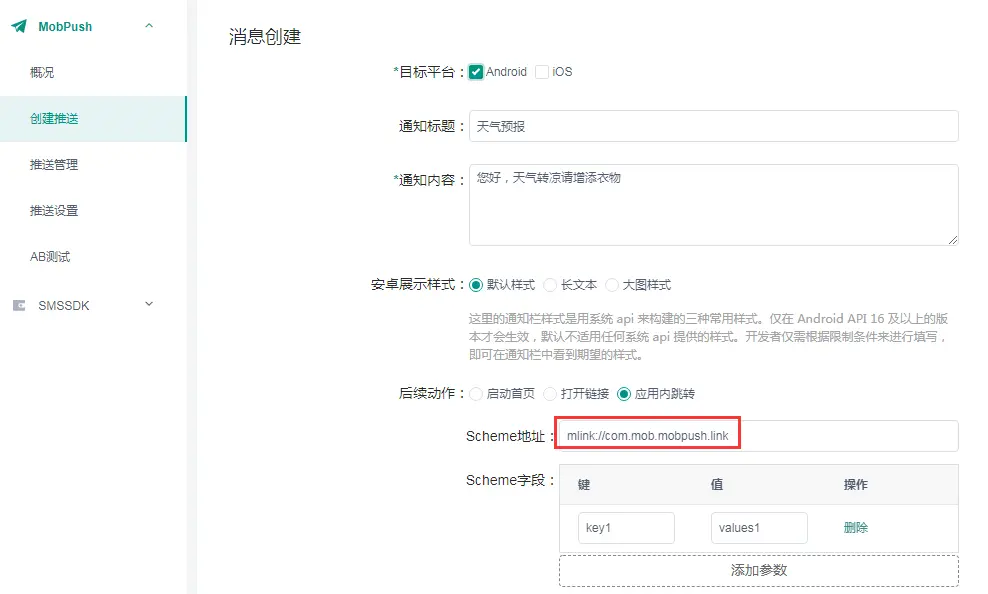
配置好之後,推送就App就可以接收到推送直接打開指定的Activity界面了,建議統一設置一箇中轉頁,根據傳遞參數後再進行跳轉。
獲取回調的參數詳情
1、當app顯示在前台的時候,會觸發MobPushReceiver的onNotifyMessageOpenedReceive方法,MobPushNotifyMessage參數則是回調的通知詳情,可以根據回調參數進行處理;
2、當app進程殺掉的時候,點擊通知後拉起應用的啓動頁面,會觸發啓動Activity的OnCreate或OnNewIntent方法,通過getIntent方法拿到回傳的Intent,可以拿到通知詳情;
此方式可以配合方式一跳轉具體頁面做為中轉頁面使用,MobPush提供了統一的方法來獲取
//通過scheme跳轉詳情頁面可選擇此方式
JSONArray var = new JSONArray();
var =  MobPushUtils.parseSchemePluginPushIntent(getIntent());
//跳轉首頁可選擇此方式
JSONArray var2 = new JSONArray();
var2 = MobPushUtils.parseMainPluginPushIntent(getIntent());
可參考官方demo



