
功能,安裝圖形庫太麻煩,直接啓動服務器開新線程,瀏覽器跑命令
不用安裝VNC各種
當然,一點bug沒時間修復,靠各位了
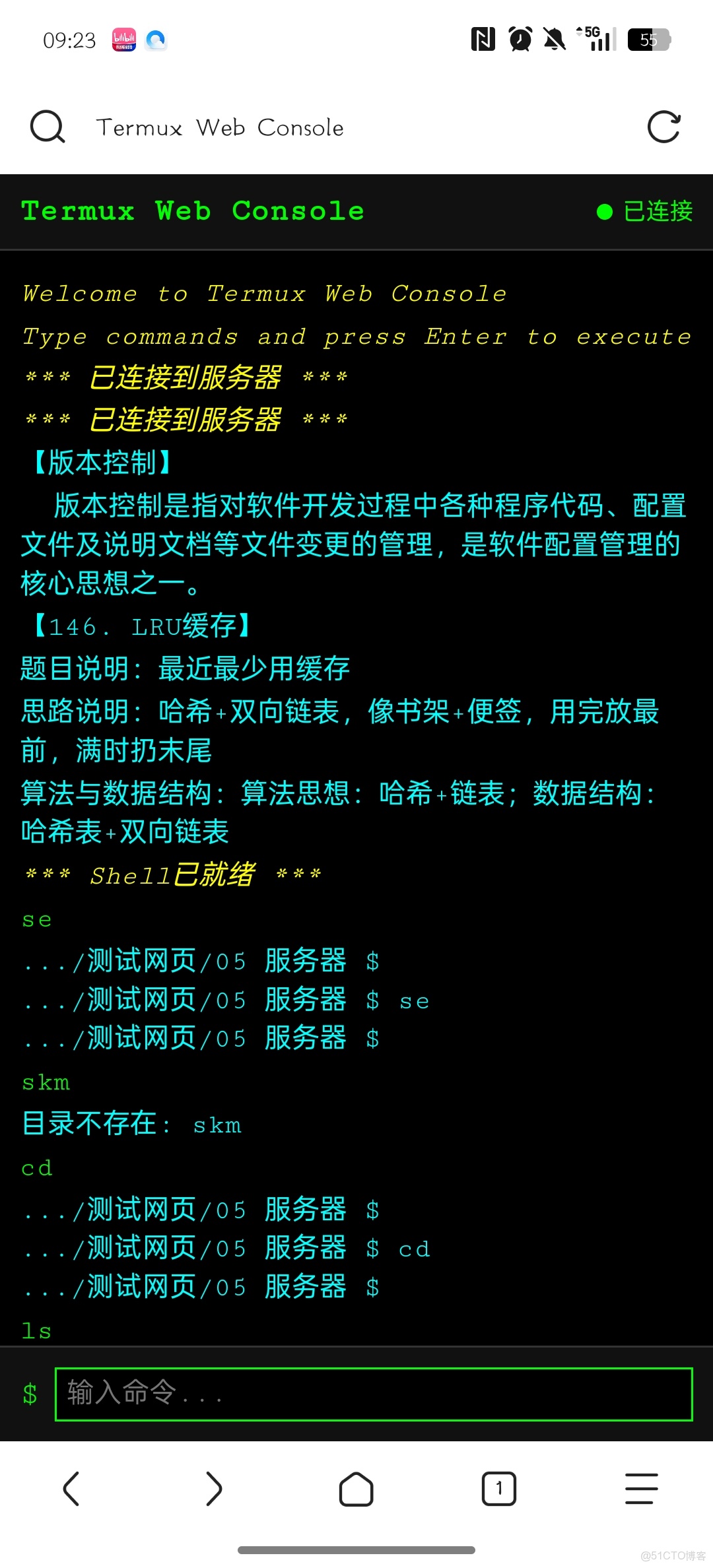
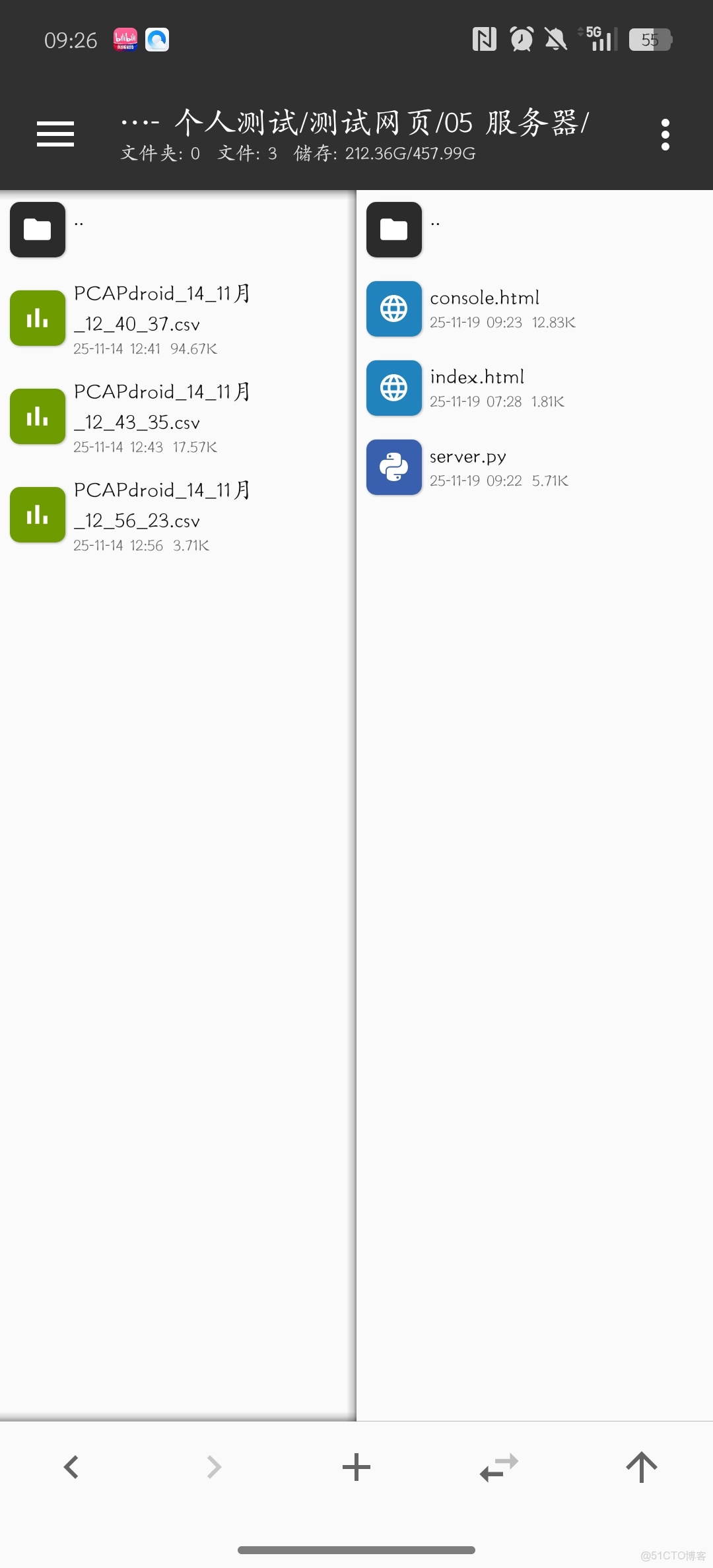
説明 console.html 是用户端,可以打包成APP等
index是隨便弄得首頁,防止報錯
<!DOCTYPE html>
<html lang="zh-CN">
<head>
    <meta charset="UTF-8">
    <meta name="viewport" content="width=device-width, initial-scale=1.0">
    <title>Termux Web Console</title>
    <style>
        body {
            margin: 0;
            padding: 0;
            background: #000;
            font-family: 'Courier New', monospace;
            height: 100vh;
            display: flex;
            flex-direction: column;
            color: #0f0;
        }

        .header {
            background: #111;
            padding: 10px;
            border-bottom: 1px solid #333;
            display: flex;
            justify-content: space-between;
            align-items: center;
        }

        .header h2 {
            margin: 0;
            color: #0f0;
            font-size: 16px;
        }

        .status {
            display: flex;
            align-items: center;
            gap: 5px;
            font-size: 12px;
        }

        .status-dot {
            width: 8px;
            height: 8px;
            border-radius: 50%;
            background: #666;
        }

        .status.connected .status-dot {
            background: #0f0;
        }

        .status.disconnected .status-dot {
            background: #f00;
        }

        #terminal {
            flex: 1;
            background: #000;
            color: #fff;
            padding: 10px;
            overflow-y: auto;
            font-family: 'Courier New', monospace;
            font-size: 14px;
            line-height: 1.4;
            white-space: pre-wrap;
        }

        .terminal-line {
            margin: 2px 0;
            word-wrap: break-word;
        }

        .command-line {
            color: #0f0;
        }

        .output-line {
            color: #fff;
        }

        .error-line {
            color: #f00;
        }

        .status-line {
            color: #ff0;
            font-style: italic;
        }

        .input-prompt {
            color: #0ff;
        }

        .user-input {
            color: #0f0;
        }

        .input-container {
            background: #111;
            padding: 10px;
            border-top: 1px solid #333;
            display: flex;
            align-items: center;
        }

        .prompt {
            color: #0f0;
            margin-right: 8px;
        }

        #command-input {
            flex: 1;
            background: #000;
            border: 1px solid #333;
            color: #0f0;
            padding: 5px;
            font-family: 'Courier New', monospace;
            font-size: 14px;
            outline: none;
        }

        #command-input:focus {
            border-color: #0f0;
        }
    </style>
</head>
<body>
    <div class="header">
        <h2>Termux Web Console</h2>
        <div id="status" class="status disconnected">
            <span class="status-dot"></span>
            <span>未連接</span>
        </div>
    </div>

    <div id="terminal"></div>

    <div class="input-container">
        <span class="prompt">$</span>
        <input type="text" id="command-input" placeholder="輸入命令..." autocomplete="off">
    </div>

    <script>
        const terminal = document.getElementById('terminal');
        const input = document.getElementById('command-input');
        const statusEl = document.getElementById('status');
        let eventSource = null;
        let commandHistory = [];
        let historyIndex = -1;
        let currentCommand = '';
        let awaitingInput = false;
        let lastOutputWasPrompt = false;

        // 簡單的HTML轉義
        function escapeHtml(text) {
            return text
                .replace(/&/g, '&')
                .replace(/</g, '<')
                .replace(/>/g, '>')
                .replace(/"/g, '"')
                .replace(/'/g, ''');
        }

        // 檢查是否是輸入提示
        function isInputPrompt(text) {
            // 檢查常見的輸入提示模式
            const promptPatterns = [
                /請輸入.*:?\s*$/,
                /Enter.*:?\s*$/,
                /.*:?\s*$/,
                /Password:?\s*$/i,
                /username:?\s*$/i,
                /路徑:?\s*$/,
                /目錄:?\s*$/,
                /文件:?\s*$/,
                /choice:?\s*$/i,
                /選擇.*:?\s*$/
            ];

            // 檢查是否匹配任何提示模式
            for (const pattern of promptPatterns) {
                if (pattern.test(text.trim())) {
                    return true;
                }
            }

            // 檢查是否以冒號結尾但沒有命令提示符
            if (text.trim().endsWith(':') && !text.includes('$') && !text.includes('#')) {
                return true;
            }

            return false;
        }

        function addLine(text, className = '') {
            const line = document.createElement('div');
            line.className = `terminal-line ${className}`;

            // 清理文本
            let cleanText = escapeHtml(text);

            // 如果看起來像HTML標籤,移除它們
            if (cleanText.includes('<span') || cleanText.includes('</span>')) {
                cleanText = cleanText.replace(/<[^>]*>/g, '');
            }

            // 移除ANSI轉義序列
            cleanText = cleanText.replace(/\x1b\[[0-9;]*[a-zA-Z]/g, '');

            line.innerHTML = cleanText;
            terminal.appendChild(line);
            terminal.scrollTop = terminal.scrollHeight;
        }

        function addCommand(command) {
            currentCommand = command;
            addLine(`$ ${command}`, 'command-line');
        }

        function addUserInput(inputText) {
            addLine(inputText, 'user-input');
        }

        function updateStatus(connected) {
            if (connected) {
                statusEl.className = 'status connected';
                statusEl.querySelector('span:last-child').textContent = '已連接';
            } else {
                statusEl.className = 'status disconnected';
                statusEl.querySelector('span:last-child').textContent = '未連接';
            }
        }

        function connect() {
            if (eventSource) {
                eventSource.close();
            }

            eventSource = new EventSource('/stream');

            eventSource.onopen = function() {
                updateStatus(true);
                addLine('*** 已連接到服務器 ***', 'status-line');
            };

            eventSource.onmessage = function(event) {
                try {
                    const data = JSON.parse(event.data);

                    switch(data.type) {
                        case 'stdout':
                        case 'stderr':
                            let outputText = data.text;

                            // 跳過重複的命令顯示
                            if (currentCommand && outputText.includes(currentCommand)) {
                                const cmdIndex = outputText.indexOf(currentCommand);
                                if (cmdIndex !== -1) {
                                    outputText = outputText.substring(cmdIndex + currentCommand.length).trim();
                                }
                                if (outputText.trim()) {
                                    // 檢查是否是輸入提示
                                    if (isInputPrompt(outputText)) {
                                        addLine(outputText, 'input-prompt');
                                        awaitingInput = true;
                                        lastOutputWasPrompt = true;
                                    } else {
                                        addLine(outputText, data.type === 'stderr' ? 'error-line' : 'output-line');
                                        lastOutputWasPrompt = false;
                                    }
                                }
                            }
                            // 檢查是否是輸入提示
                            else if (isInputPrompt(outputText)) {
                                addLine(outputText, 'input-prompt');
                                awaitingInput = true;
                                lastOutputWasPrompt = true;
                            }
                            // 普通輸出
                            else if (outputText.trim()) {
                                addLine(outputText, data.type === 'stderr' ? 'error-line' : 'output-line');
                                lastOutputWasPrompt = false;
                            }
                            break;
                        case 'status':
                            addLine(data.text, 'status-line');
                            break;
                        case 'error':
                            addLine(data.text, 'error-line');
                            break;
                        case 'heartbeat':
                            // 忽略心跳
                            break;
                    }
                } catch (e) {
                    console.error('解析消息錯誤:', e);
                }
            };

            eventSource.onerror = function() {
                updateStatus(false);
                addLine('*** 連接斷開 ***', 'error-line');
                setTimeout(connect, 3000);
            };
        }

        async function executeCommand(command) {
            if (!command.trim()) return;

            addCommand(command);
            commandHistory.push(command);
            historyIndex = commandHistory.length;

            try {
                const response = await fetch('/execute', {
                    method: 'POST',
                    headers: {
                        'Content-Type': 'application/json',
                    },
                    body: JSON.stringify({ command: command })
                });

                if (!response.ok) {
                    const error = await response.json();
                    addLine(`錯誤: ${error.message}`, 'error-line');
                }
            } catch (error) {
                addLine(`網絡錯誤: ${error.message}`, 'error-line');
            }
        }

        async function sendInput(inputText) {
            try {
                const response = await fetch('/execute', {
                    method: 'POST',
                    headers: {
                        'Content-Type': 'application/json',
                    },
                    body: JSON.stringify({ command: inputText })
                });

                if (!response.ok) {
                    const error = await response.json();
                    addLine(`錯誤: ${error.message}`, 'error-line');
                }
            } catch (error) {
                addLine(`網絡錯誤: ${error.message}`, 'error-line');
            }
        }

        // 事件監聽器
        input.addEventListener('keydown', function(e) {
            if (e.key === 'Enter') {
                const command = input.value;
                input.value = '';

                if (awaitingInput) {
                    // 如果正在等待輸入,顯示用户輸入併發送
                    addUserInput(command);
                    sendInput(command);
                    awaitingInput = false;
                } else {
                    // 否則作為命令執行
                    executeCommand(command);
                }
            } else if (e.key === 'ArrowUp') {
                e.preventDefault();
                if (historyIndex > 0) {
                    historyIndex--;
                    input.value = commandHistory[historyIndex];
                }
            } else if (e.key === 'ArrowDown') {
                e.preventDefault();
                if (historyIndex < commandHistory.length - 1) {
                    historyIndex++;
                    input.value = commandHistory[historyIndex];
                } else {
                    historyIndex = commandHistory.length;
                    input.value = '';
                }
            }
        });

        // 點擊終端聚焦輸入框
        terminal.addEventListener('click', function() {
            input.focus();
        });

        // 初始化
        window.addEventListener('load', function() {
            connect();
            input.focus();
            addLine('Welcome to Termux Web Console', 'status-line');
            addLine('Type commands and press Enter to execute', 'status-line');
            addLine('');
        });
    </script>
</body>
</html>
import subprocess
import threading
import queue
import json
from flask import Flask, request, jsonify, Response, send_from_directory
import os
import time
import sys

app = Flask(__name__, static_folder='.', static_url_path='')

# 添加CORS支持
@app.after_request
def after_request(response):
    response.headers.add('Access-Control-Allow-Origin', '*')
    response.headers.add('Access-Control-Allow-Headers', 'Content-Type,Authorization')
    response.headers.add('Access-Control-Allow-Methods', 'GET,PUT,POST,DELETE,OPTIONS')
    return response

# --- 全局變量 ---
shell_process = None
output_queue = queue.Queue()
shell_ready = threading.Event()

def enqueue_output(stream, q, stream_name):
    """從子進程流中讀取數據並放入隊列"""
    try:
        while True:
            line = stream.readline()
            if not line:
                break
            if line:
                text = line.decode('utf-8', errors='replace').rstrip()
                q.put({'type': stream_name, 'text': text})
    except Exception as e:
        q.put({'type': 'error', 'text': f"流讀取錯誤({stream_name}): {str(e)}"})
    finally:
        stream.close()
        q.put({'type': 'status', 'text': f"{stream_name}流已關閉"})

def start_shell_session():
    """啓動一個持久的shell會話和讀取線程"""
    global shell_process
    print("正在啓動Termux Shell會話...")

    try:
        shell_process = subprocess.Popen(
            ['/data/data/com.termux/files/usr/bin/bash', '-i'],
            stdin=subprocess.PIPE,
            stdout=subprocess.PIPE,
            stderr=subprocess.PIPE,
            bufsize=0,
            env=os.environ.copy()
        )

        t_stdout = threading.Thread(target=enqueue_output, args=(shell_process.stdout, output_queue, 'stdout'))
        t_stderr = threading.Thread(target=enqueue_output, args=(shell_process.stderr, output_queue, 'stderr'))

        t_stdout.daemon = True
        t_stderr.daemon = True

        t_stdout.start()
        t_stderr.start()

        time.sleep(1)

        if shell_process.poll() is None:
            shell_ready.set()
            print("Shell會話已啓動成功。")
            output_queue.put({'type': 'status', 'text': '*** Shell已就緒 ***'})
        else:
            print(f"Shell啓動失敗,退出碼: {shell_process.poll()}")
            output_queue.put({'type': 'error', 'text': f'*** Shell啓動失敗,退出碼: {shell_process.poll()} ***'})

    except Exception as e:
        print(f"啓動Shell時出錯: {str(e)}")
        output_queue.put({'type': 'error', 'text': f'*** 啓動Shell失敗: {str(e)} ***'})

@app.route('/')
def index():
    """返回簡單的index.html"""
    return app.send_static_file('index.html')

@app.route('/console')
def console():
    """返回功能完整的控制枱頁面"""
    return app.send_static_file('console.html')

@app.route('/execute', methods=['POST', 'OPTIONS'])
def execute():
    """接收命令併發送到shell的stdin"""
    if request.method == 'OPTIONS':
        return '', 200

    try:
        data = request.get_json()
        if not data or 'command' not in data:
            return jsonify({'status': 'error', 'message': '未提供命令'}), 400

        command = data['command']

        if not shell_ready.is_set():
            return jsonify({'status': 'error', 'message': 'Shell未就緒'}), 503

        if shell_process and shell_process.poll() is None:
            shell_process.stdin.write((command + '\n').encode('utf-8'))
            shell_process.stdin.flush()
            return jsonify({'status': 'success'})
        else:
            return jsonify({'status': 'error', 'message': 'Shell進程已退出'}), 500
    except Exception as e:
        return jsonify({'status': 'error', 'message': str(e)}), 500

@app.route('/stream')
def stream():
    """SSE流,將shell輸出發送給前端"""
    def generate():
        # 發送初始連接消息
        yield f"data: {json.dumps({'type': 'status', 'text': '*** 已連接到服務器 ***'})}\n\n"

        if not shell_ready.is_set():
            yield f"data: {json.dumps({'type': 'status', 'text': '*** 等待Shell啓動... ***'})}\n\n"
            shell_ready.wait(timeout=5)

        while True:
            try:
                try:
                    output = output_queue.get(timeout=1)
                    yield f"data: {json.dumps(output)}\n\n"
                except queue.Empty:
                    # 發送心跳保持連接
                    yield f"data: {json.dumps({'type': 'heartbeat'})}\n\n"
                    continue

            except GeneratorExit:
                print("SSE客户端斷開連接")
                break
            except Exception as e:
                yield f"data: {json.dumps({'type': 'error', 'text': f'流錯誤: {str(e)}'})}\n\n"

    # 移除 'Connection' 和 'X-Accel-Buffering' 頭
    return Response(generate(), mimetype='text/event-stream',
                   headers={'Cache-Control': 'no-cache'})

if __name__ == '__main__':
    start_shell_session()

    # 獲取本機IP地址
    try:
        import socket
        s = socket.socket(socket.AF_INET, socket.SOCK_DGRAM)
        s.connect(("8.8.8.8", 80))
        local_ip = s.getsockname()[0]
        s.close()
    except:
        local_ip = "localhost"

    print("\n" + "="*50)
    print("服務器已啓動!")
    print(f"本地訪問: http://localhost:8080")
    print(f"局域網訪問: http://{local_ip}:8080")
    print(f"控制枱頁面: http://{local_ip}:8080/console")
    print("="*50 + "\n")

    # 強制使用Flask開發服務器
    print("使用Flask開發服務器...")
    app.run(host='0.0.0.0', port=8080, threaded=True)
<!DOCTYPE html>
<html lang="zh-CN">
<head>
    <meta charset="UTF-8">
    <meta name="viewport" content="width=device-width, initial-scale=1.0">
    <title>Termux Web Console</title>
    <style>
        body {
            font-family: Arial, sans-serif;
            background: linear-gradient(135deg, #667eea 0%, #764ba2 100%);
            color: white;
            text-align: center;
            padding: 50px;
            margin: 0;
            min-height: 100vh;
            display: flex;
            flex-direction: column;
            justify-content: center;
            align-items: center;
        }
        .container {
            background: rgba(0, 0, 0, 0.3);
            padding: 40px;
            border-radius: 15px;
            box-shadow: 0 10px 30px rgba(0, 0, 0, 0.3);
            max-width: 500px;
        }
        h1 {
            margin-bottom: 30px;
            font-size: 2.5em;
        }
        .button {
            display: inline-block;
            background: #4CAF50;
            color: white;
            padding: 15px 30px;
            text-decoration: none;
            border-radius: 5px;
            font-size: 1.2em;
            margin: 10px;
            transition: background 0.3s;
        }
        .button:hover {
            background: #45a049;
        }
        .info {
            margin-top: 30px;
            font-size: 0.9em;
            opacity: 0.8;
        }
    </style>
</head>
<body>
    <div class="container">
        <h1>🚀 Termux Web Console</h1>
        <p>服務器正在運行中...</p>

        <a href="/console" class="button">打開控制枱</a>

        <div class="info">
            <p>提示:將此URL分享給同一網絡下的其他設備</p>
            <p>其他設備訪問: http://[你的手機IP]:8080/console</p>
        </div>
    </div>
</body>
</html>
本文章為轉載內容,我們尊重原作者對文章享有的著作權。如有內容錯誤或侵權問題,歡迎原作者聯繫我們進行內容更正或刪除文章。
